
Emoji Up genmoji sticker maker
Mobile entertainment s.r.lPersonalization
4.2944.00 Reviews
- Version
- 4.1.0
- Installs
- 1.00M
- Age Rating
- Everyone
Screenshots
Our Review of Emoji Up genmoji sticker maker
 Analysis by Appyee
When I choose a personalization app, I care less about having the biggest collection and more about whether I can make something that feels like me, then use it without turning a quick message into a project. Emoji Up is aimed at that sweet spot: it gives emoji and sticker creation a playful, hands-on feel, while also bringing themes, fonts, keyboard customization and cat mystery games into the mix. That variety is appealing, though it also means the app is best for people who enjoy exploring creative extras rather than those looking for a single, stripped-down tool.
I’d consider it when ordinary emoji feel too generic, or when I want a sticker with a little more personality than the options already built into a chat app. If my priority were simply to type faster, keep my keyboard visually plain, or avoid another place to browse add-ons, I’d stick with the tools I already use. The useful question is whether making and finding playful visual details is part of how you communicate, not whether you need another keyboard at all.
A good fit for expressive chats, with a few trade-offs
In everyday use, the strongest reason to try Emoji Up is that it treats visual expression as something you can shape, not just select from a fixed row of symbols. I can imagine using it to make a sticker for a running joke in a group chat, or to find a more fitting reaction when a standard emoji feels flat. The creative step is part of the appeal; if I only want to send a quick thumbs-up, opening a separate customization app may be more effort than the moment deserves.
Its mix of AI emoji, Genmoji, fonts, themes, keyboard options and cat mystery games makes the experience broader than a conventional emoji keyboard. That breadth is a strength for curious users, but it can also make the app feel less focused if all you want is one dependable set of stickers. I’d approach it as a small creative playground and decide which parts I actually return to, rather than assuming every feature will become part of my daily routine.
How it compares with familiar alternatives
Compared with the standard emoji and sticker pickers built into messaging apps, Emoji Up puts more emphasis on personalization and browsing. Those built-in pickers are usually the sensible choice when speed and consistency matter most: they are already where I’m writing, and there’s no extra creative step. Emoji Up makes more sense when I want to make a visual choice feel less routine, or spend a few minutes exploring styles before sharing something.
It also sits between a dedicated keyboard-customization app and a focused sticker maker. A keyboard-first alternative may suit someone who mainly wants to change the look of typing, while a specialist sticker editor may be easier to understand for someone whose only goal is to build a particular pack. Emoji Up’s wider collection of creative directions is more inviting if I like switching between them, but less compelling if I want one narrow tool with no distractions.
Small habits that make it more useful
One practical way to get more from a customization app is to create with a destination in mind. Before experimenting, I’d think of the person or chat where I’m likely to use the result: a friend who appreciates silly reactions, a family conversation where a playful sticker fits, or a social post that needs a more personal touch. That simple choice gives the session a purpose and helps avoid making lots of designs that seem fun in the moment but never leave the app.
I’d also treat the community as a source of ideas rather than a replacement for my own taste. Browsing other people’s creations can help me notice combinations or styles I wouldn’t have tried, but a popular-looking design may not suit the tone of my conversations. A useful workflow is to look around first, identify what I like about a design, then make or choose something that feels appropriate for the recipient. Personalization works best when the result is readable and recognizably yours, not merely busy.
What to expect before making it your default
Emoji Up is free to download, with optional in-app purchases ranging from under a dollar to around thirty-six dollars per item. I’d start by exploring the free experience and only consider paying if I find a specific extra I genuinely want; the presence of paid items makes it sensible to check what is included before treating the app as an unlimited source of every design. The app is for everyone, and it comes from Mobile entertainment s.r.l. Its current version is 3.9.8, and it runs on Android 7.0 or later.
The audience figures suggest it has found a substantial group of users: it has over a million installs, an average rating of 4.3, and around seventeen thousand ratings, alongside hundreds of written reviews. I read that as a useful sign of interest, not a guarantee that the app will suit my habits. A creative keyboard can be personal by nature: what feels fun to one person may feel cluttered or unnecessary to another.
A realistic way to try it
Picture a quiet moment before replying in a group chat. A friend has shared a photo that deserves a more specific reaction than a standard laughing face, so I open the app, browse or create something that matches the joke, then share it. If that takes only a little longer than choosing a normal emoji and the result gets reused, the extra choice has paid off. If I spend several minutes searching and then return to the standard keyboard, that tells me the app is better as an occasional creative detour than as a daily default.
That trial also answers a practical question: do I need to replace my usual keyboard to benefit? Not necessarily. I can think of the app as a place to explore and prepare visual expression, then decide whether its keyboard features deserve a regular role in how I type. Keeping that distinction in mind makes it easier to test the creative side without changing a familiar typing routine before I know whether I like the change.
Who should look elsewhere
I’d skip it if I want a minimal keyboard, dislike browsing collections, or need a tool whose only job is to send a quick, standard emoji. It may also be a poor match if I expect every part of a broad personalization app to be equally useful to me. In that case, a built-in messaging picker or a dedicated tool focused on one task is likely to feel more direct. The occasional loading pause can interrupt the playful flow, too, so anyone who values instant access above creative variety may find that friction more noticeable.
There is also a small switching cost to consider. Trying a different keyboard or building a new habit takes attention, and not every contact or conversation needs custom artwork. I’d keep the normal emoji picker close at hand for routine replies and use Emoji Up when I have a reason to add something distinctive. That makes the app an optional creative layer instead of a commitment to redesign every message.
Released in July 2020, Emoji Up has had time to establish itself as a personalization app rather than a one-off novelty. Still, I wouldn’t choose it based on longevity or popularity alone. I’d choose it because I enjoy experimenting with emoji, stickers, fonts or themes, and because the app’s mix of creative options gives me more than one way to make a conversation feel personal.
Ever found yourself scrolling through endless emoji options and still feeling like none of them quite capture what you're trying to say? Well, that’s where Emoji Up comes into play. I recently got my hands on this app, and let me tell you, it’s a game-changer for anyone who loves spicing up their text conversations with a bit of flair.
Create Your Unique Emoji
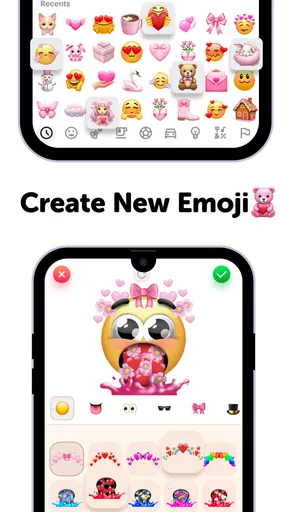
At the heart of Emoji Up is its standout feature: the ability to create personalized emojis. The app lets you dive into a world of customization, where you can tweak and adjust everything from facial expressions to accessories. Imagine designing an emoji that looks just like you or represents your mood perfectly. It’s like having your own emoji wardrobe!
The interface is super intuitive, which means you don’t have to be a tech whiz to navigate through the options. Just select your base, and you’re off to the races, adding eyes, mouths, and even funky hats. It’s a blast to see your creations come to life, and you’ll probably find yourself losing track of time as you experiment with different combinations.
Sticker Heaven
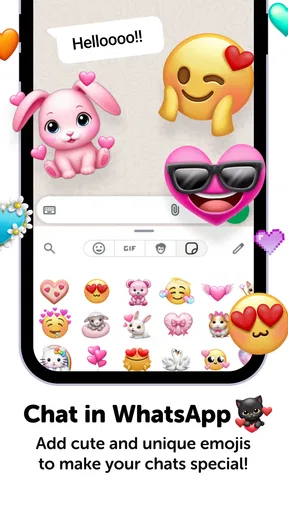
But wait, there’s more! Emoji Up isn’t just about emojis. The app also doubles as a sticker maker, allowing you to turn your creations into stickers. This is perfect for those who want to add a personal touch to their messages or social media posts. You can even share your stickers with friends, making it a fun way to connect and express yourself.
Sharing is a breeze. The app integrates smoothly with popular messaging platforms, so you can send your custom stickers with just a few taps. It’s a neat way to stand out in a sea of standard emojis and stickers.
User Experience and Design
The design of the app is sleek and modern, with a bright, cheerful color scheme that invites you to get creative. Navigation is straightforward, and the app runs smoothly without any hiccups. I did notice that it occasionally takes a moment to load new elements, but this is a minor hiccup in an otherwise seamless experience.
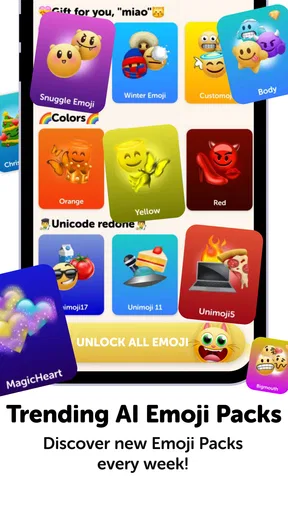
One feature I particularly appreciate is the app's community aspect. You can browse and download creations from other users, which means the possibilities are nearly endless. It’s like having access to a global emoji design team, and the creativity on display is truly inspiring.
Why You’ll Love It
Now, let’s talk about why you’ll fall head over heels for Emoji Up. If you’re someone who values personalization and wants to add a unique touch to your digital conversations, this app is right up your alley. It’s a fantastic blend of creativity and utility, offering endless possibilities to express yourself.
Plus, for those who love to keep their app library fresh, Emoji Up is regularly updated with new features and elements. This means there’s always something new to explore, and your emoji game will never go stale.
Final Thoughts
In a world where digital communication is more prevalent than ever, having a tool like Emoji Up is a delightful way to enhance your interactions. Whether you’re crafting the perfect emoji to match your mood or creating stickers that speak to your unique style, this app has it all.
So, if you’re ready to take your emoji game to the next level, give Emoji Up a try. It’s fun, it’s creative, and it just might become your new favorite app. Don’t just take my word for it—dive in and start creating your own emoji masterpieces today!
Verdict
Strengths of Emoji Up genmoji sticker maker
- Easy to use interface for creating stickers.
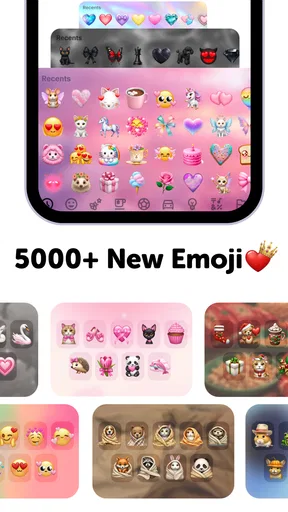
- Wide variety of emojis to customize.
- Smooth performance with minimal lag.
- Regular updates with new features.
- Shareable across multiple platforms.
Limitations of Emoji Up genmoji sticker maker
- Limited free features; many are paid.
- Occasional ads can be disruptive.
- Some designs lack originality.
- Requires internet for full functionality.
- No option for custom color palettes.
Similar Picks in This Category
View All
Microsoft SwiftKey AI Keyboard
SwiftKey4.3

Wallpapers
Google LLC4.1

Zedge™ Wallpapers & Ringtones
Zedge4.7

Yandex Browser with Alice AI
Direct Cursus Computer Systems Trading LLC4.3

Ringtone Maker:create ringtone
Big Bang Inc.4.7

Fonts Keyboard
Fonts Keyboard3.9
Frequently Asked Questions
What features does Emoji Up genmoji sticker maker offer?
Emoji Up genmoji sticker maker allows users to create personalized emojis and stickers with a wide range of customization options. You can adjust facial expressions, accessories, and colors to match your style. The app also includes a library of pre-made stickers and emojis for quick use.
Is Emoji Up genmoji sticker maker free to use?
The app offers a free version with basic features and a selection of stickers. However, for access to premium features and an expanded library of emojis, users may need to purchase a subscription or make in-app purchases. Check the app store for the latest pricing details.
How user-friendly is the Emoji Up genmoji sticker maker interface?
Emoji Up genmoji sticker maker is designed with a clean and intuitive interface, making it easy for users of all ages to navigate. The drag-and-drop functionality and clear instructions ensure a smooth and enjoyable creative process, even for beginners.
Can I share my custom emojis and stickers on social media?
Yes, Emoji Up genmoji sticker maker allows you to easily share your creations on popular social media platforms like Instagram, WhatsApp, and Facebook. The app provides direct sharing options, enabling you to showcase your personalized emojis with friends and followers effortlessly.
Does Emoji Up genmoji sticker maker require an internet connection?
While you can create and save emojis offline, an internet connection is required to access certain features such as downloading new sticker packs and sharing directly to social media. For the best experience, it's recommended to use the app with a stable internet connection.
